Calendly Booking Link Generator
Sales and customer success teams generating outbound Calendly links were doing it manually: logging into Calendly, creating a link for each recipient, copying it into an email or CRM, and separately noting the activity somewhere. At any meaningful volume (SDR outreach sequences, onboarding invites, renewal touchpoints) that process added friction and left no audit trail.
We built an n8n webhook endpoint that generates a personalized, single-use Calendly scheduling link on demand, pre-fills it with the recipient's name, email, and UTM attribution, logs the link to Google Sheets, fires a Slack notification, and returns the complete URL in the HTTP response, all within a single API call.
The Workflow
Trigger: Webhook (HTTP POST)
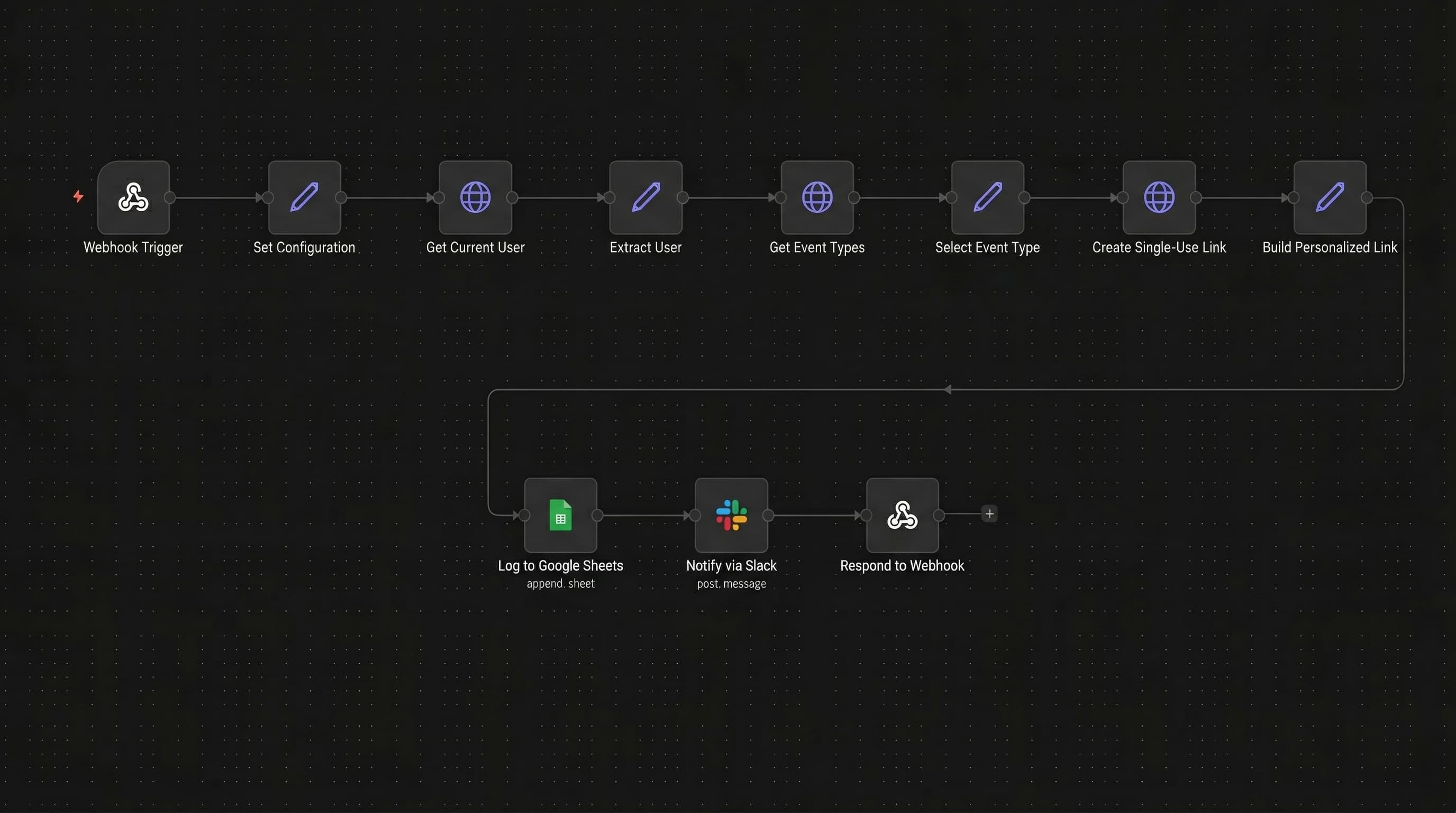
Node 1 - Webhook Trigger
Listens for POST requests at the path generate-calendly-link. Response mode is set to responseNode, which holds the HTTP connection open until the Respond to Webhook node fires at the end of the chain. The caller receives the generated link in the same request.
Stage 1: Input Normalization
Node 2 - Set Configuration Extracts four fields from the POST body and assigns fallback values for any absent parameters:
recipient_email(fallback:test@example.com)recipient_name(fallback:Test User)requested_event_type: the specific Calendly event type URI if provided; fallback: empty string (triggers auto-selection)utm_source(fallback:n8n)
Stage 2: Calendly User and Event Type Resolution
Node 3 - Get Current User (Calendly API)
GET request to https://api.calendly.com/users/me using Calendly OAuth2 credentials. Returns the authenticated user's resource object including their URI, which is required to scope the subsequent event types query. Configured with onError: continueRegularOutput.
Node 4 - Extract User
Reads the /users/me response and assigns two fields (user_uri and user_name) while preserving all prior fields for downstream use.
Node 5 - Get Event Types (Calendly API)
GET request to https://api.calendly.com/event_types with two query parameters: user (the resolved user_uri) and active: true. Returns the list of active scheduling event types for the authenticated user. Configured with onError: continueRegularOutput.
Node 6 - Select Event Type
Determines which event type to use for the link. If requested_event_type from the POST body is non-empty, that URI is used. Otherwise defaults to the first active event type returned by Calendly. Extracts selected_event_type_uri, selected_event_type_name, and selected_event_duration (fallback: 30 minutes).
Stage 3: Link Creation and Personalization
Node 7 - Create Single-Use Link (Calendly API)
POST request to https://api.calendly.com/scheduling_links with the following body:
{
  "max_event_count": 1,
  "owner": "{{ selected_event_type_uri }}",
  "owner_type": "EventType"
}
max_event_count: 1 enforces single-use behavior; the link expires after one booking. Configured with onError: continueRegularOutput.
Node 8 - Build Personalized Link
Constructs the final URL by appending three URL-encoded query parameters to the base booking URL returned by Calendly: name, email, and utm_source. Pre-filling these parameters means the recipient lands on a form with their details already populated. Also captures link_created_at as an ISO timestamp. Seven fields are assembled here and carried forward to all three downstream nodes.
Stage 4: Logging, Notification, and Response
Node 9 - Log to Google Sheets
Appends a row to the "Generated Links" tab with seven columns: Recipient Name, Recipient Email, Event Type, Duration (min), Booking URL, Created At, and Status (hardcoded as Sent). Configured with onError: continueRegularOutput, so a Sheets failure does not block the Slack notification or the HTTP response.
Node 10 - Notify via Slack
Posts a message to the #general channel with recipient name, email, event type name, duration, and the personalized booking URL as a hyperlinked "Click to Book" anchor. Markdown enabled, link unfurling disabled. Configured with onError: continueRegularOutput.
Node 11 - Respond to Webhook Returns HTTP 200 with a JSON body to the calling system:
{
  "success": true,
  "booking_url": "<personalized_booking_url>",
  "base_url": "<base_booking_url>",
  "recipient": { "name": "...", "email": "..." },
  "event": { "name": "...", "duration_minutes": 30 },
  "created_at": "<ISO timestamp>",
  "expires": "Single-use or 90 days"
}
The caller receives the fully formed link in the same HTTP response that triggered the workflow.
Results
- One API call replaces the full manual link generation process. No Calendly login, no manual copy-paste, no separate logging step
- Every generated link is personalized. Recipient name, email, and UTM source are pre-filled as URL-encoded query parameters on the booking URL
- Single-use enforcement.
max_event_count: 1ensures each link can only be used to book once - Full audit trail in Google Sheets. Every link generated is logged with recipient details, event type, duration, timestamp, and status
- Slack visibility. The team sees each generated link in real time without polling the sheet
- Resilient by design. Five nodes carry
onError: continueRegularOutputso partial API failures in Calendly, Sheets, or Slack do not abort the response back to the caller
Stack
| Layer | Tool |
|---|---|
| Automation | n8n (self-hosted) |
| Trigger | Webhook (HTTP POST, generate-calendly-link) |
| Scheduling API | Calendly REST API v2 (OAuth2) |
| Endpoints Used | GET /users/me · GET /event_types · POST /scheduling_links |
| Logging | Google Sheets (append) |
| Notification | Slack |
| Response | n8n Respond to Webhook node |
My Role
- Mapped all four input fields with their fallback values and designed the input normalization stage to handle partial or absent POST body parameters gracefully
- Wired the
user_urifrom/users/medirectly into theuserquery parameter of the/event_typescall - Implemented the event type selection logic: prefer the caller-specified URI, fall back to
collection[0].uri, with a 30-minute duration fallback - Built the personalized URL by appending name, email, and
utm_sourceas URL-encoded query parameters to the base booking URL - Configured the
/scheduling_linksPOST body withmax_event_count: 1andowner_type: "EventType"to enforce single-use behavior - Defined all seven column mappings for the Google Sheets append, including the hardcoded
Sentstatus value - Specified the Slack message structure with mrkdwn enabled, link unfurling disabled, and the booking URL rendered as a "Click to Book" anchor
- Applied
onError: continueRegularOutputto five nodes and configuredresponseMode: responseNodeon the webhook trigger to hold the HTTP connection until the final response fires